


KUALA LUMPUR, Malaysia, May 30, 2024 /PRNewswire/ — The go-to skincare brand among dermatologists, COSRX is excited to announce the launch of the #AffiliateWithCOSRX TikTok Challenge, running from April 15th to July 31st 2024. This four-month initiative aims to give skincare lovers the opportunity to do more of what they love – that is try skincare, share their thoughts via engaging content, win amazing prizes while simultaneously earning a little cash on the side!
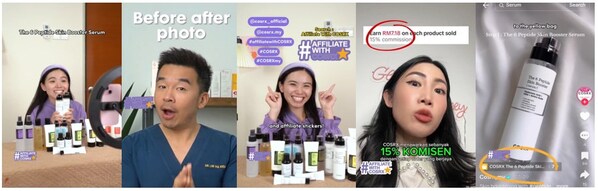
Join the #AffiliateWithCOSRX
The campaign is designed to connect COSRX with TikTok’s vibrant community of budding influencers, giving them the opportunity to showcase their creativity and expand their online presence, all the while enjoying a multitude of rewards. By joining the TikTok affiliate program and tagging the official COSRX TikTok shop (@cosrx_my) in their yellow basket, influencers are able to monetize their content. That is, each time their viewers click the unique link and make a purchase, influencers earn a commission.
How to Participate:
Participating in the #AffiliateWithCOSRX TikTok Challenge is very simple:
- Post a review video or a video emphasizing the unique selling points (USPs) of any COSRX product.
- Include the key hashtag #AffiliateWithCOSRX in the caption.
How to Join #AffiliateWithCOSRX
Benefits:
Create content and earn up to 15% commission. In addition to this, each month, COSRX will select one best winner to receive a pair of AirPods.
Announcement Dates:
- 1st Announcement: May 10th, 2024
- 2nd Announcement: June 14th, 2024
- 3rd Announcement: July 12th, 2024
Winners will be announced on the second Friday of each month on the official COSRX TikTok channel.
Grand Prizes:
COSRX will select two participants who will receive an exclusive trip to South Korea. This includes flights, accommodation and a unique opportunity to visit the COSRX headquarters for a trip to remember. To be eligible for this, participants must submit a minimum of 30pcs of content, that have tagged COSRX products in the yellow basket and include the key hashtags #AffiliateWithCOSRX #COSRX #COSRXMY and #COSRXMalaysia.
So, take the leap. Join the #AffiliateWithCOSRX challenge for the opportunity of a lifetime!
ABOUT COSRX
With its powerful yet affordable skincare solutions, COSRX has quickly become one of world’s favorite skincare brands. Using a minimal number of highly effective natural extracts in concentrated doses, COSRX products deliver visible results by treating the skin with only the essentials it needs and nothing it doesn’t. Find its best-selling skincare solutions at retailers nationwide, including Malaysia TikTok Shop, Shopee, and Watsons Malaysia.


